Power and Process Monitoring
The iba system tells you exactly what is happening in your plants and your energy system. The components are all perfectly coordinated with one…
Learn more
An essential feature of the iba system is the distinct connectivity to other automation systems and bus technologies. The iba bus monitors make it possible to connect to different field bus and drive technologies.
Talk to an Expert
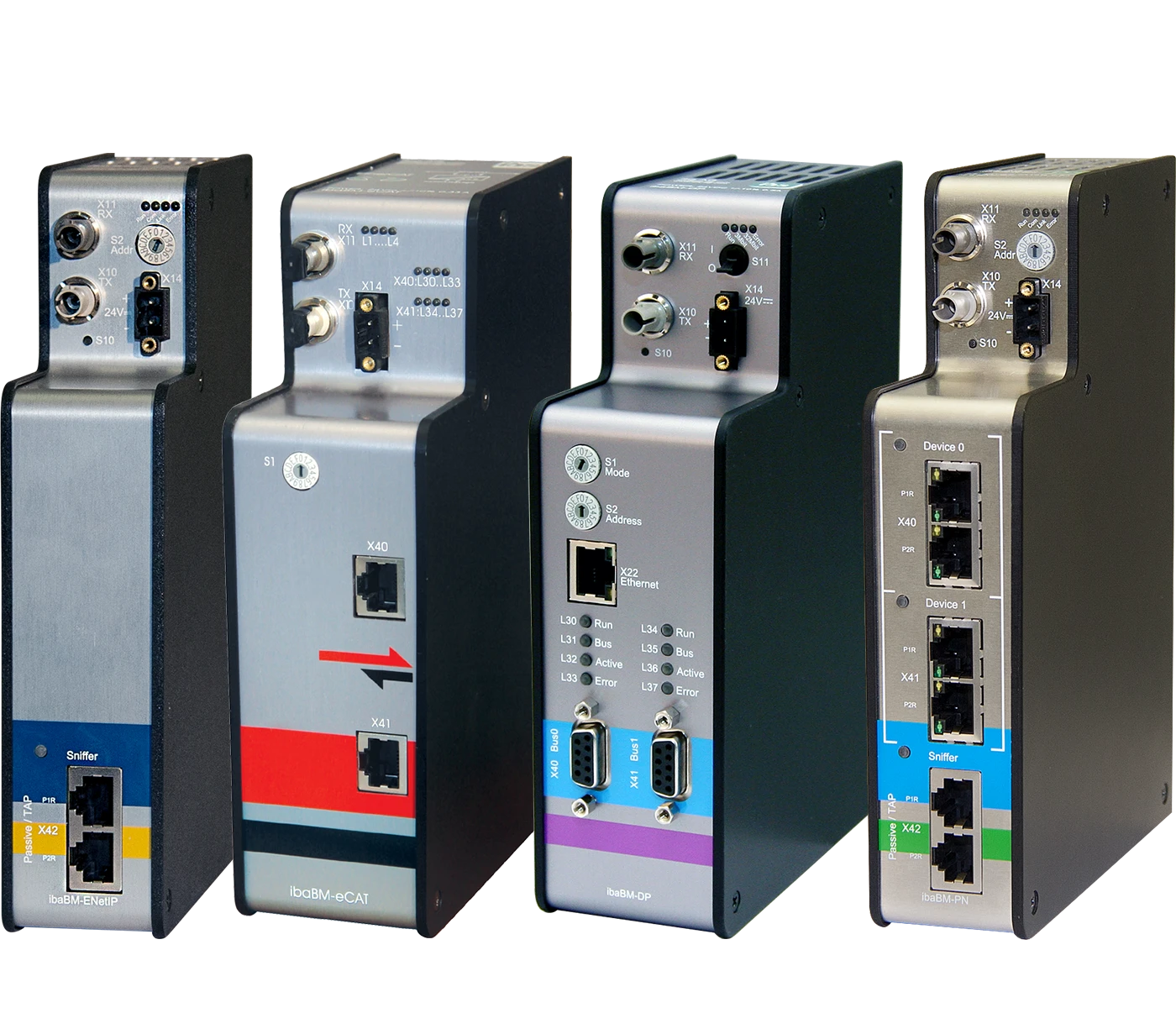
We get along with almost anybody
The iba system offers various ways to access the signals of control systems. In automated manufacturing, the components involved communicate frequently over field and drive buses. To date, different field and drive bus standards have been established in the industry. By using the iba bus monitors, an iba data acquisition system can be connected to standard bus technologies and acquire data from the buses and the connected hardware.


* Additional license required


The ibaBM-PN bus monitor supports PROFINET specification V2.3.
The bus monitor has two independent, internal PROFINET devices that can be supplied with data by PROFINET controllers. A bus monitor can communicate with up to 8 PN controllers. For this purpose, the device has to be integrated in a PN engineering project. Integration in line or star topologies is possible, as well as connection to two independent PROFINET lines. The both internal PN devices of the bus monitor can be configured independently in ibaPDA. Each of the internal PN devices can capture up to 1440 Bytes (incl. status bytes) per cycle.
The devices can also be used to send data via PROFINET from ibaPDA to a controller. Certain signal values can be monitored for example, and, if a limit value is exceeded, a warning message can be issued or other events indicated. A data volume of up to 1440 Bytes per device is possible.
System integration examples as active device

Each of the two PN devices supports S2 system redundancy1 independently of each other. This means that configurations using one or two PROFINET devices are possible. Example topology see diagram below left.
PROFINET distinguishes between real time (RT) communication and synchronous isochronous realtime (IRT) communication. ibaBM-PN supports both types of communication, where cycle times up to 250μs are possible. In addition, ibaBM-PN supports as a client the Media Redundancy Protocol (MRP) as well as Media Redundancy for Planned Duplication (MRPD), which are used in ring structures. The device complies with NetLoad Class III.

To act as a sniffer, ibaBM-PN can be coupled with the TAP interface (Ethernet) without interference in the PROFINET network. As a sniffer, the device monitors the entire data exchange on the line and can therefore read the data sent. The entire communication via the TAP interface is also mirrored to a monitor port where it can be recorded using an external network analysis tool. Integration into the configuration of the PROFINET controller is not necessary.
Furthermore, ibaBM-PN provides the function of acquiring and recording data as sniffer on a SINAMICS link, thus replacing the bus monitor ibaBM-SiLink in a function-compatible way. SINAMICS Link is a special type of PROFINET communication for exchanging PROFINET IRT data between Siemens SINAMICS controllers (CU320-2PN and CU320- 2DP or CUD). SINAMICS Link is based on a strict, straight network topology with a maximum of 64 PROFINET (PN) controllers. Each controller sends data that ibaBM-PN can read and acquire.
For a convenient measurement using PROFINET, the request1 procedure of ibaPDA can be used for SIMATIC S7. Using the request procedure, internal variables of the PLC can be freely requested. The values to be measured can be selected by means of their symbolic names.
On the fiber optic side, ibaBM- PN works with the ibaNet protocol 32Mbit Flex. Thus, measuring and configuration data are transferred via a bidirectional fiber optic connection. The sampling rate and data formats can be adjusted flexibly. Up to 4060 Bytes can be transmitted with a cycle time of 1.4 ms.
The device can be connected to two separate PROFIBUS networks independently through two PROFIBUS connections. Transmission rates up to 12 Mbit/s are supported by the device and are automatically detected. Using the sniffer function of ibaBM-DP, the cyclical data traffic on PROFIBUS (acc. to DP-V0) can be monitored and acquired. Internal slaves can be activated in parallel on the device and can have data written on them directly from the master. For special applications, additional operating modes such as redundancy mode*, simulation mode*, mirror mode*, mapping mode* and P2P mode are available.
ibaBM-DP works with the ibaNet protocol 32Mbit Flex by default on the fiber optic side. Thus, measurement and configuration data are transferred via a bidirectional fiber optic connection. Therefore, a FO card ibaFOB- D is required at the ibaPDA side. The sampling rate and the data formats can be flexibly adjusted. Up to 4060 Bytes max. can be transmitted with a cycle time of 1.4 ms. The amount of data falls with faster sampling rates. The device also offers modes of compatibility for the ibaNet protocols 32Mbit and 3Mbit. This makes it possible to exchange the previous devices ibaBM-DPM-S and ibaBM- DPM-S-64 without changing the configuration in ibaPDA. The compatibility modes can also be used with previous FO cards.
For a convenient measurement over PROFIBUS, the request* procedure for SIMATIC S7, FM458, and for TDC can be used by ibaPDA. Using the request procedure, internal variables of the PLC can be freely requested. The values to be measured can be selected simply using their symbolic names and/or operands.

Due to the sniffer function, ibaBM-DP can read all data sent on PROFIBUS DP (cyclical data exchange to DP-V0). The device must merley be connected to PROFIBUS. The device does not need to be configured as a PROFIBUS slave in order to use the sniffer function.
Up to 8 slaves (extension to 16 slaves possible with additional license) can be activated on the ibaBM-DP bus monitor. The maximum output data range of each slave is 244 Bytes, which can be written by the master. Active slaves have to be configured by means of the provided GSD file. The active slaves can be distributed to both PROFIBUS connections. The sniffer function and the active slaves can be used simultaneously. Active slaves can also be used to send data via PROFIBUS from ibaPDA to a master. For example, certain signal values can be monitored and, if a limit value is exceeded, a warning message can be issued or other events indicated.
With the ‘redundancy mode’ option, ibaBM-DP can read and acquire data on redundant PROFIBUS lines on S7‑400H control systems, both as sniffer and as active slave. ibaBM-DP monitors the telegram traffic on both PROFIBUS lines and dynamically detects, over which line valid data are currently being sent that are recorded with ibaPDA. This procedure offers the advantage that data do not need to be acquired twice. ibaBM-DP immediately identifies error situations such as the transition of a CPU to STOP, the failure of a slave connection or broken cables and automatically switches to the intact bus system.
Redundancy Example
With the ‘simulation mode’ option, software and the configuration of a DP master station can be tested without the need for a peripheral system of the PROFIBUS to be physically present. This means, for example, that a new control program can be tested in a test environment. This way, expensive down times during commissioning can be reduced.
ibaBM-DP simulates the slaves as they are configured in the master. It is not necessary to carry out a PROFIBUS configuration in ibaBM-DP since the configuration telegrams of the master are evaluated for the simulation.
The input values of the slaves are simulated using a TCP/IP telegram interface and the output values are requested. The use of this TCP/IP interface for the simulation of the plant is possible using any tools.
Simulation mode example

The ‘mirror mode’ option is ideally suitable for modernizations where a new control system needs to run in test mode alongside the plant in operation. ibaBM-DP is coupled into the original PROFIBUS link via a PROFIBUS connection. The second connection is connected to the new control system. ibaBM-DP mirrors resp. simulates the slaves from the original line in the parallel system and the input data are also copied in this process. Thus, a new control system can be tested in parallel with the original slaves and the real input data. Signals from the original and parallel system can be recorded and compared simultaneously with ibaPDA using the sniffer function.
Mirror mode example
The P2P mode (peer-to-peer) enables a bidirectional system interconnection via PROFIBUS with iba devices with an ibaNet 32Mbit interface (e.g. via ibaLink-VME to VME-based control systems). For this purpose, the data from the ibaNet interface are mapped on up to 8 PROFIBUS slaves.
P2P mode example
The mapping mode offers extensive possibilities for exchanging data between two connected PROFIBUS systems. The functionality is suitable for modernization, but also for pure data coupling at PROFIBUS level. A classic DP-DP coupler mode is available, in which data can be exchanged bidirectionally between slaves on both PROFIBUS systems. In addition, the data from slaves of the first PROFIBUS system can also be read and transferred to a slave of the second PROFIBUS system. In total, up to 8 assignments can be used (even 16 if the number of active slaves is extended).
Mapping mode example

In order to record data transmitted over an EtherCAT line with ibaPDA, ibaBM-eCAT should be connected directly to the EtherCAT wire, positioned in line right next to the EtherCAT MainDevice. The setup of the signals can be retrieved from the EtherCAT project file from the automation system, provided that the ENI export file of the EtherCAT configuration has been imported in ibaPDA. Hence, the signals of all configured terminals are available in ibaPDA. The signals can be comfortably selected just by a mouseclick using the symbol browser. Alternatively it is possible to address the signals directly.
Moreover, you can configure ibaBM-eCAT as EtherCAT SubDevice on the EtherCAT line. Hence, it can be addressed by the EtherCAT MainDevice. This way, the EtherCAT MainDevice can address exactly the user data that is needed for recording with ibaPDA. Those signals are regarded as outputs from the EtherCAT bus‘ view. For ibaBM-eCAT as sniffer and/or slave applies: ibaPDA can acquire up to a total of 512 analog and 512 digital values in each signal direction according to the sampling rate configured on the EtherCAT bus. The following data types are supported: BYTE, SINT, WORD, INT, DWORD, DINT, REAL, FLOAT and LREAL.
If no ENI export file of the EtherCAT configuration is available, the symbol browser cannot be used for signal selection. Using the EtherCAT browser, it is optionally possible to select the values for acquisition directly from the EtherCAT bus. The EtherCAT browser also contains diagnostic functions of the bus. For example, the individual telegrams can be analyzed and cycle and turnaround times can be displayed. A large number of diagnostic signals describing the EtherCAT bus are available for acquisition in ibaPDA.
Procedure For a convenient measurement over EtherCAT, the request procedure can be used by ibaPDA. Using the request procedure, internal variables of the PLC can be freely requested via ibaBM-eCAT. The values to be measured can be addressed with their symbolic names and simply selected in ibaPDA using a browser.

The EtherNet/IP bus monitor ibaBM-ENetIP is a device for acquiring the cyclical data exchange between EtherNet/IP scanners (master) and adapters (slaves). The device can be integrated into an existing EtherNet/ IP network with one or more EtherNet/IP scanners (master). The ibaBM-ENetIP bus monitor can be operated with the TAP-interface (Ethernet) in an Ether- Net/IP network without interferences. As sniffer, the device listens to the cyclic data exchange of the IO data (implicit messaging) between EtherNet/IP scanner (master) and adapters (slaves).
The entire communication via the TAP-interface is being mirrored to a monitor port and can be recorded using an external network analysis tool.
Flex On the optical-fiber side, ibaBM- ENetIP works with the ibaNet protocol 32Mbit Flex. With this protocol, measuring and configuration data are transferred via a bidirectional fiber optic connection. The sampling rate and the data formats can be configured flexibly.

The device has 3 pairs of fiber optic links which provide the functions as follows:
ibaBM-DDCS detects the connected drives with the corresponding signals automatically. The device enables free and interference free access to the drive’s parameter and to the communication telegrams between drive and controller. ibaBM-DDCS supports the ibaNet protocol 32Mbit Flex. The sampling rate can be up to 40 kHz, whereby up to 4060 Byte can be transmitted over the fiber optics to the ibaPDA computer. One ibaBM-DDCS device can simultaneously monitor all drives which are connected to a common bus line. In theory this can be over 100 drives per device.
Get inspired by product use cases and learn how value is created.
The iba system tells you exactly what is happening in your plants and your energy system. The components are all perfectly coordinated with one…
Learn more
Failures in automated systems can lead to production downtime and inferior quality. Failure mode analysis is easily achieved for maintenance personnel…
Learn more
Automated real time monitoring of processes, machines and plants is based on acquired measurement data, camera images and calculated characteristic…
Learn more
The iba Condition Monitoring System combines vibration-based characteristic values with process and material data to reliably detect wear on plants.…
Learn more
For documenting the automatically manufactured products, quality data and characteristic values need to be calculated and reliably stored in a quality…
Learn more
The iba system enables continuous acquisition and long-term storage of process and machine data in high temporal resolution. All data is centrally…
Learn more
For reliable real-time monitoring of vibrations, offline analysis tools for optimization and validation are indispensable. The iba system offers you…
Learn more
Technical Data Acquisition and Analysis with the iba System
Learn more
To gain full transparency into machine behavior it is important to get a coherent view of how drives, PLC logic, sensors, and mechanical components…
Learn more
In modern marine propulsion systems, reliable and continuous monitoring of all components is essential to prevent failures and plan maintenance…
Learn more
With ibaNet-E, iba has developed an Ethernet-based protocol for deterministic transmission of measured values.
Learn more
Edge analytics applications allow you to monitor processes locally in real time based on process data. The locally acquired process data can be…
Learn more
The iba system offers several ways to acquire data from the S7 controllers – the right solution for different requirements.
Learn more
The iba system offers several ways to acquire data from the TwinCAT or other EtherCAT-based controllers – the right solution for different…
Learn more
The iba system offers several ways to acquire data from Allen-Bradley controllers, especially via EtherNet/IP – the right solution for different…
Learn more
The iba system offers various ways to acquire data from SIMOTION and SINAMICS drive controllers – the right solution for different requirements.
Learn more
Using the ibaPDA-Interface-SINUMERIK-Xplorer interface, data can be recorded directly from Siemens SINUMERIK CNC control systems. The connection and…
Learn more
Overhead cranes are key components in many production and logistics facilities. It is therefore essential to identify potential fault sources at an…
Learn more
Increasing complexity and process speed pose significant challenges for technology-intensive manufacturing companies. Not only do these factors make…
Learn more
The more complex a system is, the greater the number of components involved in the process. However, as these influence each other, the impact of the…
Learn more
Data has long since become the most important resource of the 21st century. Modern, decentralized industrial plants use industrial bus systems to…
Learn more
To fully unlock the potential of measurement data, it must be democratized – made holistically accessible and usable across all user groups.
Learn more
Flat products are manufactured in several process steps, that do not directly follow each other in chronological order. Some products (the so-called…
Learn more
Usually, the operator does not have a free view on all components and aggregates from the control panel of a rolling mill. This is why camera systems…
Learn more
The task is to detect rhomboidity during a continuous casting process. This needs to be done to allow timely process adjustments and consequently…
Learn more
These leading companies already use this component of the iba system.
Contact us – we look forward to hearing from you! Our experts are happy to answer any questions and help you with any challenges you may face.
Talk to an ExpertRead the inspiring success stories of our satisfied customers.
GE Vernova Relies on the iba System in Sofia Project
Learn more
How Badische Stahlwerke Uses the iba System to Bring Transparency to Scrap Charging
Learn more
Badische StahlwerkeFrom Paper Chart Recorders to Modern Data Acquisition: To ensure reliable analysis and visualization of furnace data, Aluminium Norf relies on the iba…
Learn more
After the nationwide blackout in Pakistan on January 9, 2023, energy producers came under increasing pressure to enhance plant monitoring and to…
Learn more
At the cold rolling mill of thyssenkrupp Electrical Steel (tkES) in Gelsenkirchen, the team faced a familiar yet complex challenge.
Learn more
The energy transition is fundamentally reshaping power grids: decentralized generation, volatile energy sources, and increasingly dynamic grid…
Learn more
In the production of aluminum coils, proper strapping is essential to ensure safe handling and transport.
Learn more
A mining company uses the iba system to maximize the availability of electric rope shovels.
Learn more
AI-generated ImageThe heat and surface treatment of steel is a complex and sensitive technical process. With the iba system, LSV implemented a comprehensive solution…
Learn more
In order to analyze processes efficiently, Neuman Aluminium introduced the iba system in production in 2014. Due to its success, it was rolled out to…
Learn more
The commissioning of a new pusher type furnace at their Swiss location prompted Novelis to standardize the acquisition and analysis of process data.…
Learn more
Over 1,600 tons of metal, rolled into coils, pass through the BILSTEIN Group’s production facilities every day. To eliminate the risk of mix-ups, the…
Learn more
What began seven years ago with the replacement of paper chart recorders in a pusher-type furnace has evolved into a key pillar of quality assurance…
Learn more
Reducing complexity by calculating KPIs from vibration and machine data in ibaPDA using ibaInSpectra.
Learn more
As the legacy system no longer met operational demands, the BILSTEIN GROUP had to seek out a new solution for process data visualization. Their…
Learn more
Download important resources or contact our support team for further assistance.
Please contact your local sales partner for details.
| Order no. | Name | Description |
|---|---|---|
| 13.122000 | ibaBM-CAN | Bus monitor for CAN/CANopen |
| 13.121001 | ibaBM-DP | Bus monitor for PROFIBUS |
| 13.321001 | ibaBM-DP-Upgrade-8Slaves | Function extension ibaBM-DP: Additional 8 slaves |
| 13.321011 | ibaBM-DP-Upgrade-Simulation | Function extension ibaBM-DP: Simulation mode |
| 13.321021 | ibaBM-DP-Upgrade-Redundancy | Function extension ibaBM-DP: Redundancy mode |
| 13.321031 | ibaBM-DP-Upgrade-Mirror | Function extension ibaBM-DP: Mirror mode |
| 13.321032 | ibaBM-DP-Upgrade-Mapping | Function extension ibaBM-DP: Mapping mode |
| 13.127000 | ibaBM-eCAT | Bus monitor for EtherCAT |
| 13.120010 | ibaBM-ENetIP | Bus monitor for Ethernet/IP |
| 13.120000 | ibaBM-PN | Bus monitor for PROFINET |
| 13.120001 | ibaBM-PN-Upgrade-Redundancy-S2 | Function extension ibaBM-PN: Redundancy mode |
| 13.120710 | ibaBM-DDCS | Bus monitor for DDCS drive bus |